
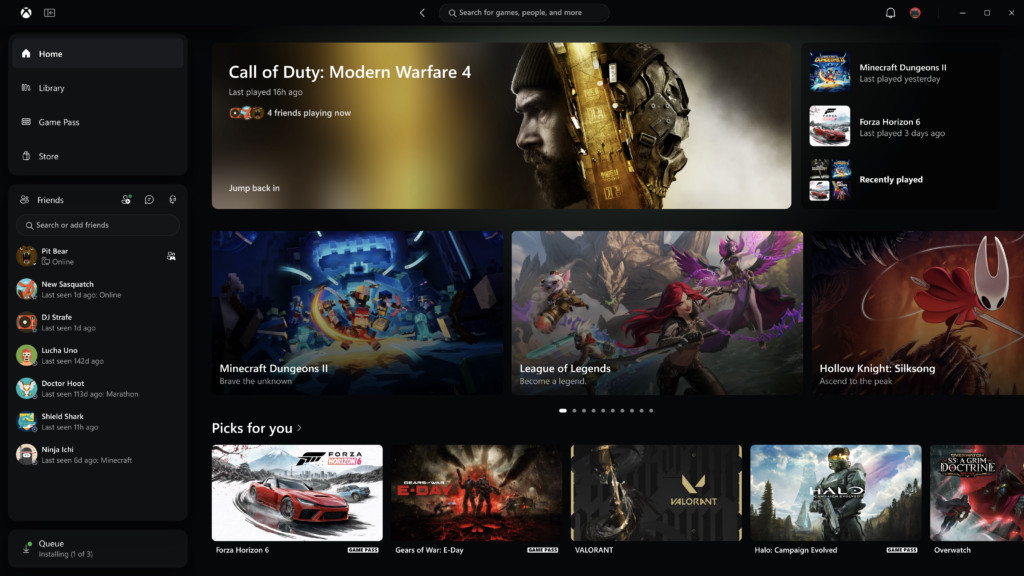
Microsoft has finally admitted what plenty of PC players have been saying for years: the Xbox app could be faster. Since 5 November, members of the Xbox Insider program have been able to try a rebuilt Xbox PC app that, by Microsoft’s own testing, launches up to 60% faster, with a reorganised library, friends moved into the main navigation and a single search bar that actually searches everything. The same refresh is rolling out to Xbox Cloud Gaming on the web, and it’s starting to reach the cloud gaming apps on TVs and VR headsets.
The changes were laid out in an Xbox Wire post that’s unusually candid by Microsoft standards. “We’ve heard where the experience could be better,” it reads, before getting into the detail.
What’s new in the Xbox PC app
Speed is the headline, and Microsoft has put numbers on it:
| Area | Improvement claimed by Microsoft |
|---|---|
| App launch | Up to 60% faster |
| Home, Store and Game Pass pages | Load up to 50% faster |
| In-app windows | Open up to 65% faster |
Those figures come with a footnote: they’re based on Microsoft’s testing and will vary with your device, connection and setup. Treat them as best-case numbers rather than a promise for every machine.
The other changes are about getting to your games with fewer clicks:
- A simpler Library. Navigation has been cleaned up, filters updated and there are new ways to organise your collection.
- Friends in the main navigation. You can see what friends are playing, start a chat or join a party without digging through menus.
- Better search. One search box now covers games, including installed titles and add-ons, as well as people.
- A cleaner look. Refreshed game cards, Home and Settings screens, and new animations.
The refreshed cloud gaming site is going wide
The new web experience for Xbox Cloud Gaming has been in preview with Insiders since earlier this year. Microsoft says it will reach more players automatically over the next few weeks, and you don’t have to wait: it’s available now at play.xbox.com.
Its most useful addition is a Library tab that gathers every game you can stream, whether you own it or play it through Game Pass, with sorting and filtering by recently played, genre and input type. That last filter is handy if you’re streaming on a laptop without a controller. A desktop mode uses the extra space on bigger screens, and there are now light and dark themes plus five high-contrast options for players who need them.
Microsoft is also starting to bring the same look and navigation to its cloud gaming apps on supported TVs and VR headsets. It frames the goal as making the basics feel familiar on every screen: finding your games, knowing what you can play and getting into a game quickly.
How to try the new Xbox app now
The PC app update is limited to Xbox Insiders for now, and Microsoft hasn’t given a date for everyone else. To get in early, join the free Xbox Insider program through the Xbox Insider Hub app on Windows PC. Microsoft points Insiders to the Xbox Insider subreddit for support and to aka.ms/XBOXplayervoice for feedback.
If you only want the cloud changes, there’s nothing to sign up for. Open play.xbox.com in a browser and you’ll get the refreshed site straight away.
Why this matters for Xbox on PC
The Xbox app has spent years as the launcher people put up with because Game Pass lives there, while Steam remained the place they actually wanted to be. A faster app doesn’t change that overnight, but it removes one of the most common complaints, and it fits Microsoft’s broader push to make PC a first-class Xbox platform. Publishers are already listing “Xbox on PC” as a platform in their own announcements.
It also lands at a sensitive moment for cloud players. Xbox Cloud Gaming hour limits began in November, so a Library tab that shows exactly what you can stream is more useful than ever if you’re rationing your time. For what’s arriving on the service this month, see our Xbox Game Pass November 2026 list, and check the games leaving Game Pass on 15 November before they disappear from your new library.
The real test is whether the speed gains hold up outside Microsoft’s testing, and how long Insiders wait before it reaches everyone. On the evidence of the cloud site, which went from an Insider preview at the start of the year to a wider rollout now, Microsoft is at least moving.