
The August 2025 Xbox system update has officially landed, and it’s packed with thoughtful quality-of-life improvements for console and PC players alike. Whether you’re diving into the Game Pass catalog on your couch or firing up your rig for a late-night session, there’s something here to make your experience that much smoother.
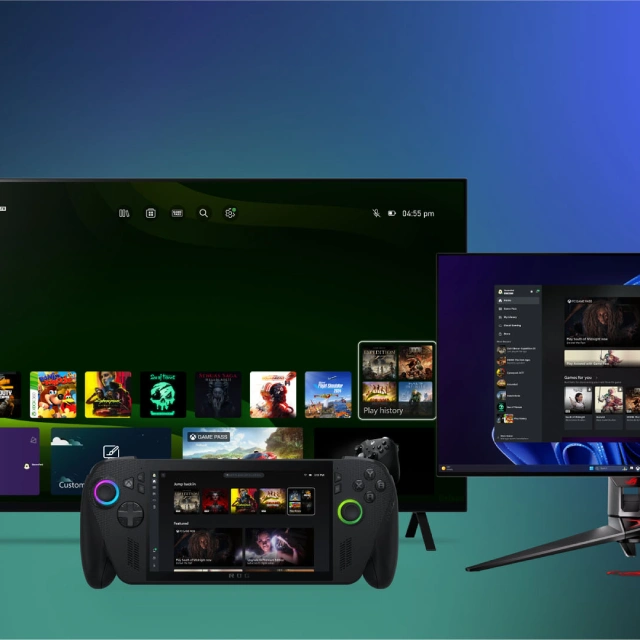
Announced in a detailed post on Xbox Wire, this update sharpens existing features tested by Xbox Insiders, while rolling out new enhancements that focus on connectivity, usability, and cross-device integration in the Xbox ecosystem.
Pick Up and Play Anywhere: Cross-Device play history is here
One of the standout features in the August update is the addition of synchronised Cross-Device and Cloud-Playable Play History. This change means your recently played games will now follow you across every Xbox platform, whether you’re on the couch, at your desk, or firing up your friend’s rig for a co-op throwdown.
That means no more digging through lists or wondering what game you played last. Every title—including those you played via Xbox Cloud Gaming — will now appear in one history across your Xbox console, cloud, and PC app. So even if you don’t technically own the game but streamed it through Game Pass, it still shows up. This move creates a more cohesive and seamless experience across the platform — perfect for gamers who jump between screens often.
PC gamers rejoice: Xbox App gets smarter and smoother
Microsoft continues its push to win over PC gamers, and part of that involves making its Xbox PC app a true hub for all things gaming. The August update introduces several improvements for PC players, starting with the new “My Apps” feature, currently available to Xbox Insiders in the PC Gaming Preview program.
Think of “My Apps” as your personalised quick access tab. It brings your most used browsers, utilities, and launchers (like Steam or Epic Games Store) right into one place, so you’re not juggling between windows. Just boot up the Xbox app and launch everything from there. It’s a small tweak, but one that feels like a big time-saver.
Also arriving in this update is Gaming Copilot (Beta), a new assistant baked into the Xbox Game Bar. Need help with a tough boss fight? Want a shortcut into matchmaking? This AI-powered tool provides contextual support without overstepping—it’s helpful when you’re stuck and invisible when you’re not.
Controller Navigation on PC Just Got a Console-Like Makeover
If you’ve ever used a controller in the Xbox PC app and found it… a bit clunky? You’re not alone. Fortunately, this latest update brings a range of controller and keyboard navigation enhancements that finally make the Xbox app feel more like using a console.
- Use familiar console shortcuts: A to select, B to go back, Y to search.
- Smarter scrolling and bumper behaviour for quick browsing through menus.
- Improved memory for focus points between pages, so you don’t lose your place.
- Cleaner UI visuals, better animations, and clearer focus indicators for both keyboard and controller users.
It’s the kind of polish that doesn’t scream for attention but definitely smooths out the friction—especially if you’ve already made your Xbox controller your go-to input method on PC.
More goodies: Dynamic backgrounds, Play Anywhere, retro classics, and more
Beyond the marquee features, the Xbox August 2025 update quietly buffs the overall ecosystem with even more additions:
- New games added to Dynamic Backgrounds to give your dashboard more visual flair.
- Expansion of the Xbox Play Anywhere library for seamless cross-buy and cross-save compatibility.
- More classics baked into the Retro Gaming catalog: nostalgia hits just keep coming.
- Mouse and Keyboard support receives further optimisation for titles that support the input combo.
- Ongoing enhancements to Xbox Stream Your Own Game features for low-latency personal streaming.
A subtle but impactful update
This isn’t a flashy overhaul, but that’s kind of the point. The Xbox August 2025 update is about convenience, speed, and continuity. These changes are designed to make micro-moments in your gaming routine just a little bit better: from switching devices to navigating apps to staying in sync across platforms.
MORE XBOX


For those of us living in that Xbox Game Pass lane — bouncing between cloud streaming, console, and PC — these updates aren’t just nice, they’re necessary. It shows Microsoft’s ongoing investment in making Xbox a truly integrated gaming ecosystem.
Whether you’re an Xbox Insider or a casual weekend warrior, there’s something in this update meant to improve the way you play. And honestly? It’s about time all your play history followed you around like a good co-op partner.